 Xero
Invoices, bills, payments, P&L, balance sheet, budgets.
Xero
Invoices, bills, payments, P&L, balance sheet, budgets.
Early access · Built in New Zealand
The morning screen for your whole business.
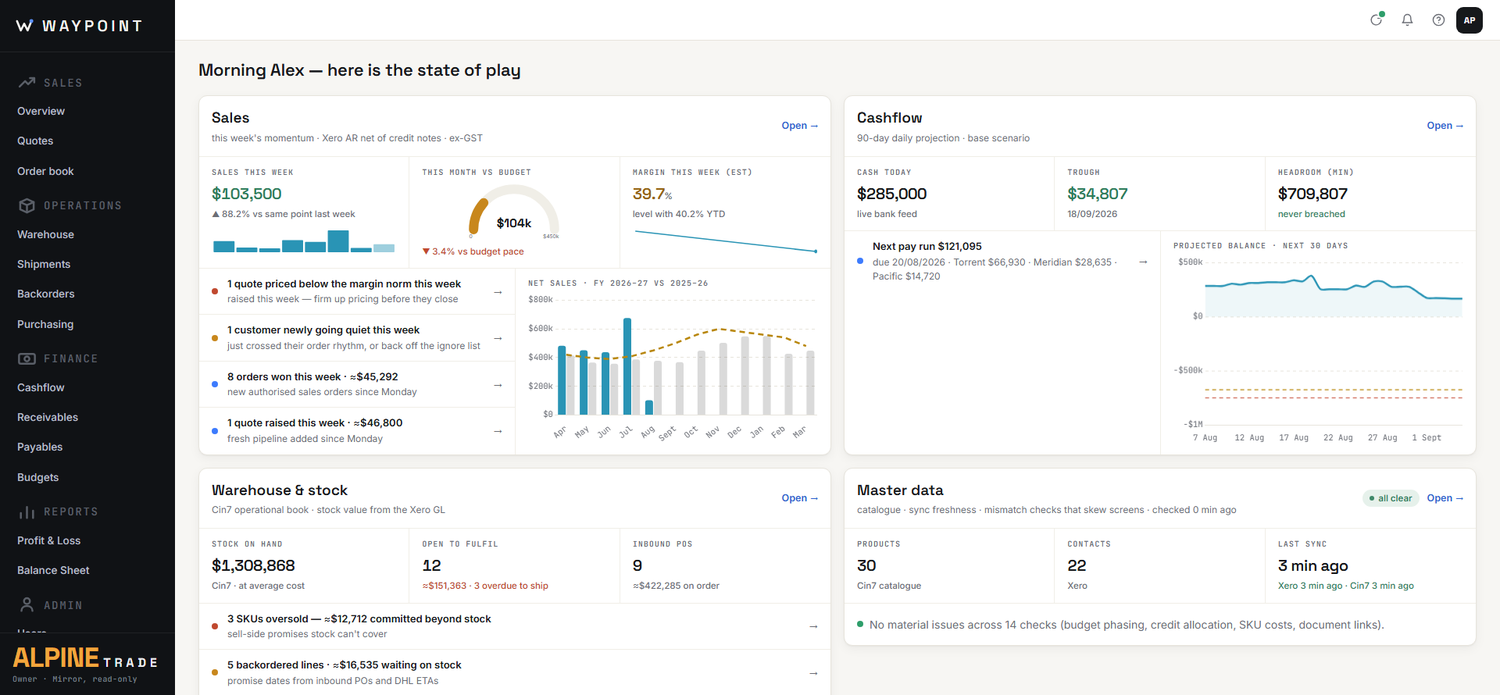
Waypoint sits on top of Xero and Cin7 Core and shows you the true state of the business — cash, stock, orders, shipments — on one screen. Then it lets you act.
Read-only by defaultYour systems stay the source of truthHosted in NZ
Why Waypoint
You already have the data.
You just can't see it in one place.
Wholesale distribution runs on good systems that don't talk to each other. So the truth about the business lives in browser tabs, exports and someone's spreadsheet.
Four tabs and a spreadsheet
Xero says one thing, Cin7 Core says another, and the reconciliation lives in a spreadsheet that was right last Tuesday.
Simple questions take an hour
"Can we cover payroll and the container due Friday?" shouldn't be a research project across three systems.
Dashboards that won't act
Most reporting tools show you the problem, then leave you to go fix it somewhere else. Seeing isn't the job — acting is.
How it works
Connect. See. Act.
01
Connect
Waypoint mirrors Xero, Cin7 Core and DHL Global Forwarding — read-only. Your systems keep their records, and every screen shows exactly when it was last synced.
02
See
One home screen for the morning, and a working screen for each part of the business. The same numbers everywhere — because they come from the same place.
03
Act
When you change something, Waypoint sends a command to the system that owns that record — and confirms it from that system's own state. No two-way sync. No sync conflicts. Ever.
The one-writer rule.
Every piece of data has exactly one system allowed to write it. Waypoint never merges, never guesses, never overwrites — which is why it can sit on top of your accounts without ever corrupting them.
The product
A working screen for every part of the business.
Not another dashboard — the place where the morning actually starts.
Sales & Customers
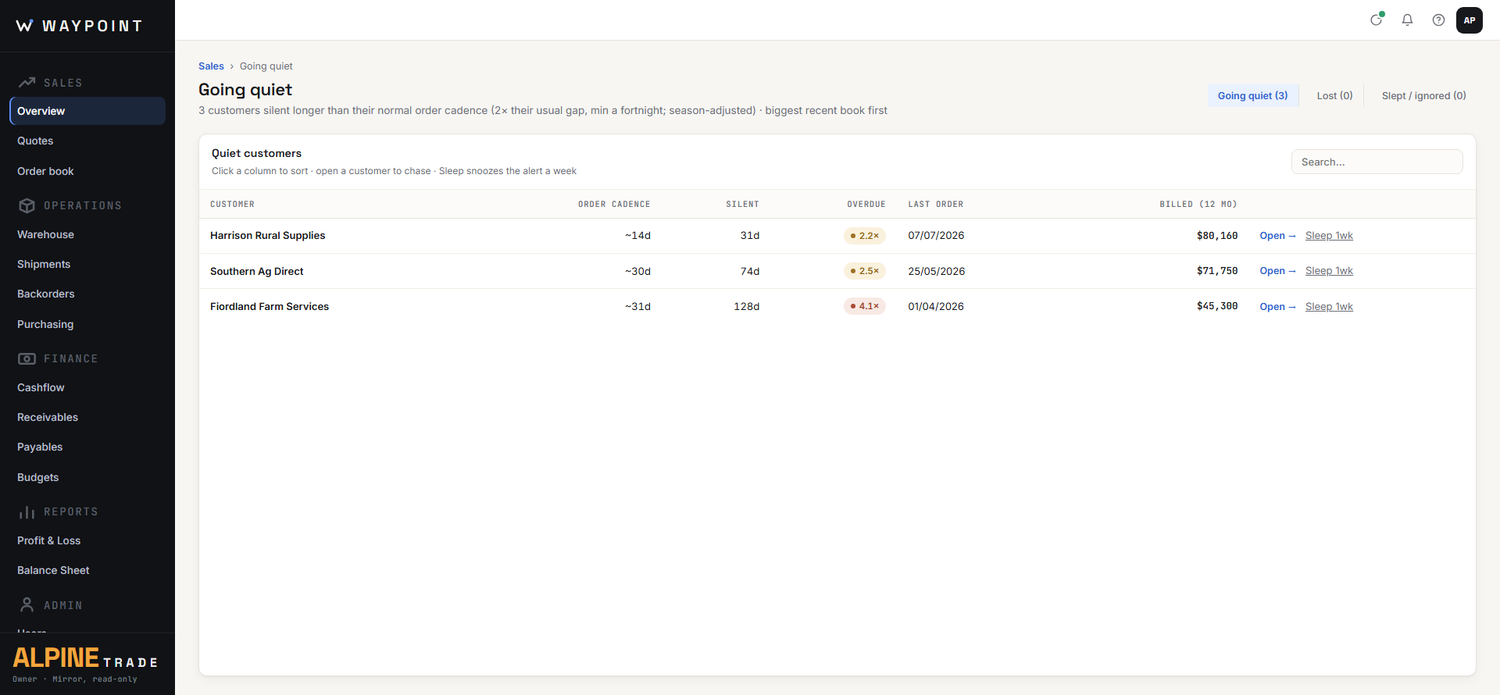
Know which customers are drifting — before they're gone.
- Sales vs budget on the selling-day clock — team view and a per-rep "my day".
- Going-quiet alerts — every customer overdue against their own buying rhythm, not a generic rule.
- Order book and open quotes with margin, plus customer pages you can walk through with the customer — costs hidden in present mode.
- A relationship log that survives staff changes — notes with full history, attached to the customer.
Operations & Warehouse
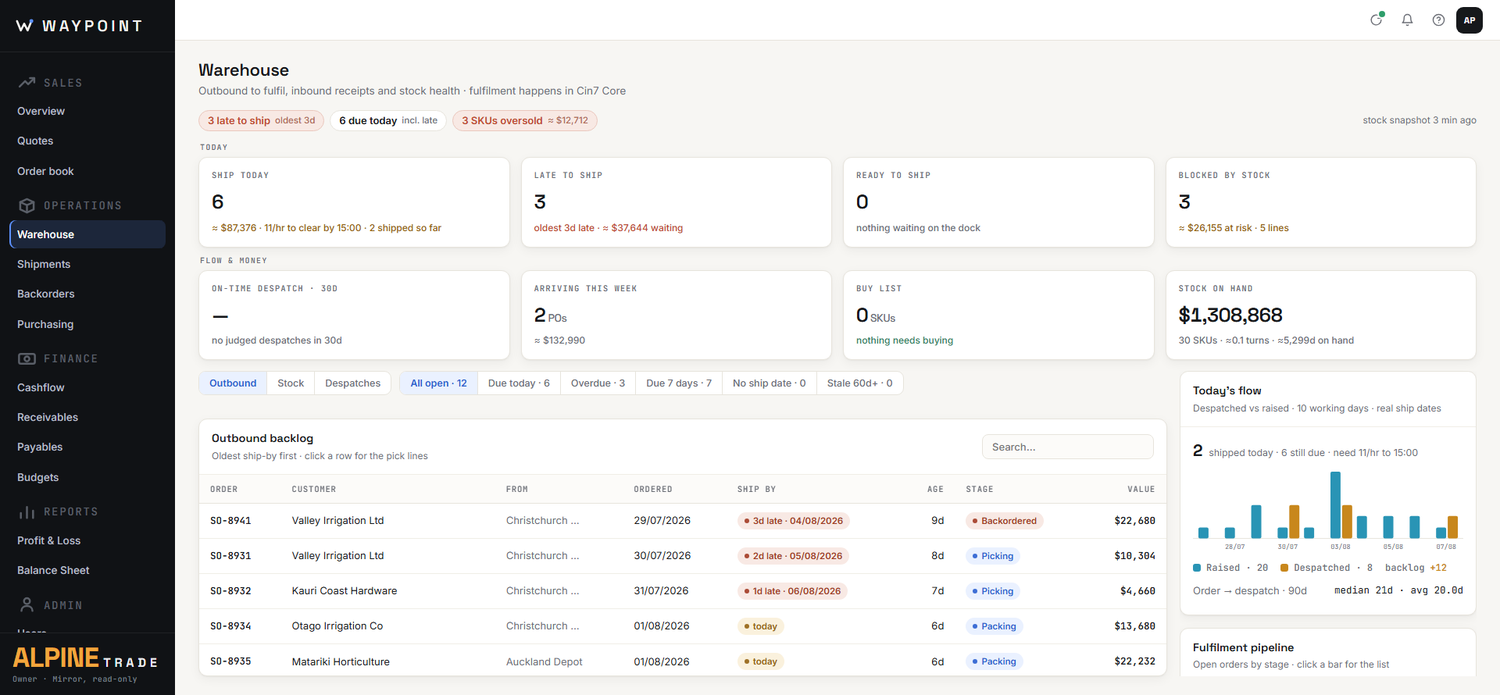
What has to ship today — and what's really in the way.
- Pick and ship queues against the despatch cutoff, with on-time despatch tracked daily.
- Stock exceptions on one screen — oversold, uncovered, reorder due, dead stock — with stock by location.
- Backorders with honest promise dates, worked out from where each line sits in the queue against incoming stock.
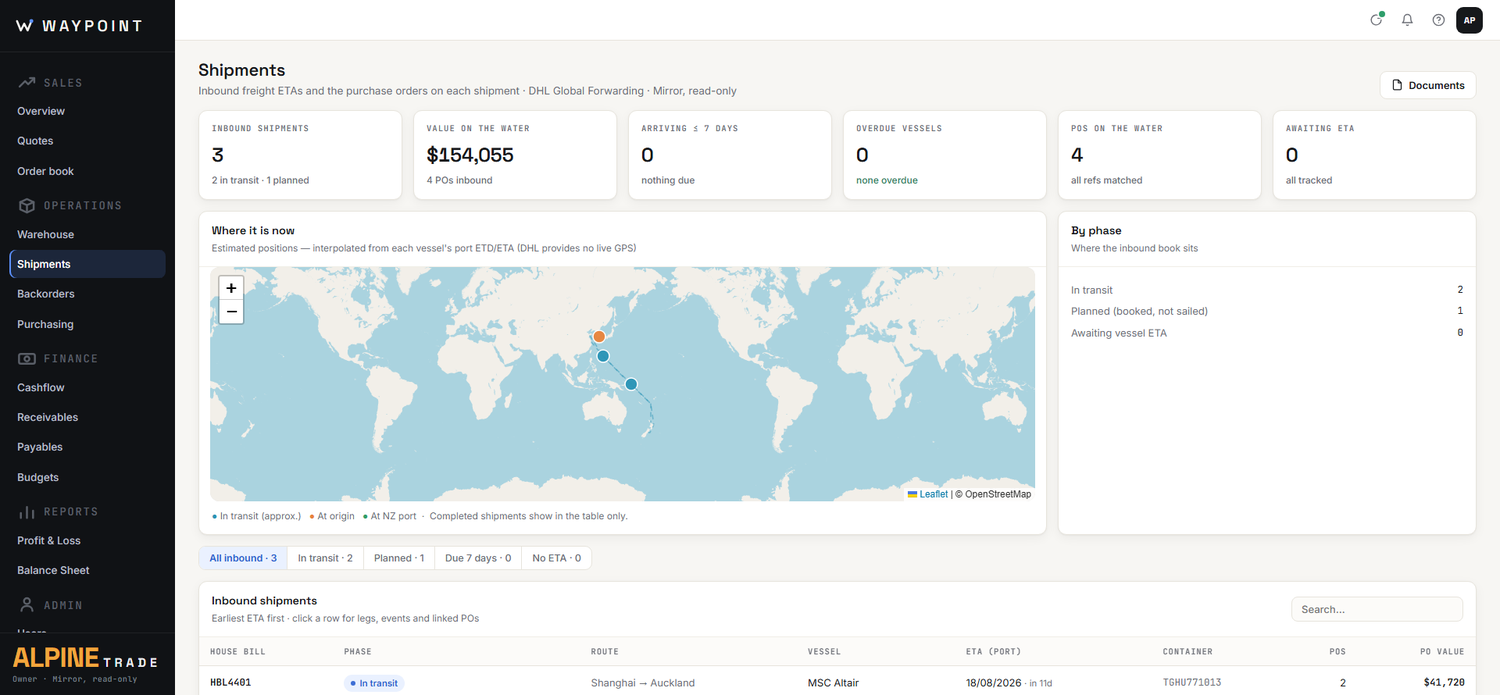
Purchasing & Freight
Your PO book, your stock budget, and every container on the water.
- The ruled PO book — every purchase order, every tranche, every landing month.
- Purchase pipeline vs stock budget, phased on real supplier terms.
- Inbound shipments by vessel ETA, linked to the purchase orders they carry.
- Shipping documents read for you — commercial invoices and packing lists parsed in your suppliers' formats (set up with you at onboarding), reconciled against what you ordered, shortfalls called out.
Finance & Cashflow
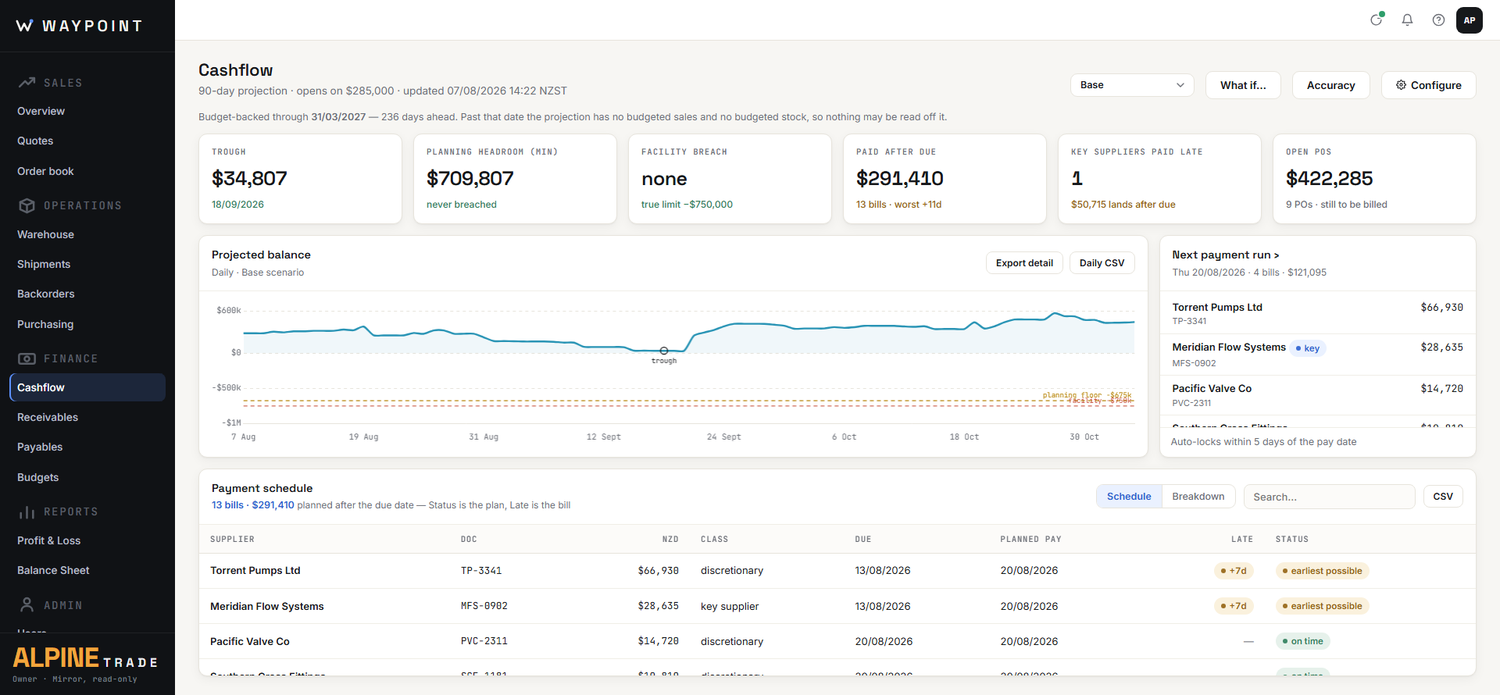
Thirteen weeks ahead — not one bank login behind.
- A cashflow forecast you can interrogate — scenarios, overdraft what-ifs, and an accuracy trail that shows how right it's been.
- Payment runs with levers — hold, defer or pin bills, then push the planned pay dates into Xero in one click.
- Receivables and payables ageing, P&L and balance sheet, mirrored live from Xero.
- Sales budgets by rep and customer, reconciled to the Xero revenue budget.
Integrations
Powered by the systems you already run.
Waypoint doesn't replace your systems — it makes sense of them together. Choose an area to see what can power it.
Xero
Invoices, bills, payments, P&L, balance sheet, budgets.
 Cin7 Core
Products, stock, sales orders, purchase orders, locations.
Cin7 Core
Products, stock, sales orders, purchase orders, locations.
 DHL Global Forwarding
Shipment tracking by vessel ETA, plus shipping-document capture.
DHL Global Forwarding
Shipment tracking by vessel ETA, plus shipping-document capture.
 Mainfreight
Shipments, tracking, rates and labels.
Mainfreight
Shipments, tracking, rates and labels.
 PortConnect
Container milestones, last-free-day and reefer telemetry.
PortConnect
Container milestones, last-free-day and reefer telemetry.
 Consignly
Consignments, tracking and labels.
Consignly
Consignments, tracking and labels.
 NZ Couriers
Courier shipments and tracking across the Freightways brands.
NZ Couriers
Courier shipments and tracking across the Freightways brands.
 NetSuite
Finance and inventory in a single ERP.
NetSuite
Finance and inventory in a single ERP.
 QuickBooks
Invoices, bills and payments.
QuickBooks
Invoices, bills and payments.
 Unleashed
Products, stock and sales orders.
Unleashed
Products, stock and sales orders.
 MRPeasy
Manufacturing — production planning and stock.
MRPeasy
Manufacturing — production planning and stock.
 HubSpot
Contacts, companies and deals.
HubSpot
Contacts, companies and deals.
 Employment Hero
Payroll, HR, timesheets and rostering.
Employment Hero
Payroll, HR, timesheets and rostering.
 When I Work
Timesheets and rostering.
When I Work
Timesheets and rostering.
 WorkflowMax
Jobs, tasks, time and costs.
WorkflowMax
Jobs, tasks, time and costs.
 Simpro
Jobs and time for trades and field service.
Simpro
Jobs and time for trades and field service.
Live connectors are running in production today. Built means the connector is finished and tested — connect the accounts you already hold and it lights up. Planned integrations aren't built yet; tell us what your stack needs and it shapes the order we build in.
Data & security
Built like it's your data. Because it is.
Your own database
Every customer gets a dedicated database — not a shared pool with everyone else's data in it.
Hosted in New Zealand
Your data lives in Microsoft's New Zealand North region, and stays onshore.
Read-only by default
Waypoint mirrors your systems. It writes only when you tell it to — and only to the system that owns the record.
Every write on the record
Each change is a logged command — sent, retried if needed, confirmed from the source system. An audit trail by construction.
And if you ever leave: your systems were the source of truth all along, so there's nothing to migrate off. We'll hand you an export of anything you created in Waypoint.
Early access
Be a founding customer.
We're onboarding a small number of New Zealand wholesale distributors. Get the morning screen, and shape what gets built next.
Book a demo